



Note
Go to the end to download the full example code.
CUDA Graph Kernel Annotations and Profiling#
Author: Shangdi Yu
How to capture CUDA graphs with kernel annotations
How to profile annotated graphs
How to export traces with inline annotations and semantic kernel lanes
How to visualize graph execution with custom stream assignments
How to use
mark_streamto recover logical stream lanesHow to annotate communication collectives with the metadata (collective type, message size, group, rank) that eager NCCL traces expose but CUDA graphs drop
PyTorch 2.15+ (use a nightly build until 2.15 is released)
CUDA-capable GPU
Driver/CUDA-compat >= 13.1 for annotation support
cuda-bindings >= 13.1.0
CUDA graphs are a powerful optimization technique that can significantly reduce kernel launch overhead by capturing and replaying sequences of CUDA operations. However, when profiling CUDA graphs, all kernels appear on the same stream, making it difficult to understand the logical structure of your computation.
This tutorial demonstrates how to use kernel annotations to add semantic labels to kernels within CUDA graphs. The profiler can include these annotations directly when exporting traces and create custom visualization lanes, making it easier to understand and debug complex graph executions.
Annotations are not limited to compute kernels. One of the most valuable uses is annotating communication collectives. In eager mode, the profiler attaches rich metadata to every NCCL kernel – the collective type, message size, process group, and ranks – so you can see exactly what each comm is doing. Under CUDA graphs that metadata is lost: the collective replays as an opaque kernel. This tutorial shows how to re-attach that metadata with annotations so graphed comms read just like eager ones.
Overview#
CUDA graph kernel annotations allow you to add semantic labels to kernels during graph capture. These labels help you understand what each kernel does when profiling, making it easy to identify which parts of your model (e.g., attention, MLP, normalization) are executing at any given time.
Without annotations, profiler traces show all kernels on a single stream with auto-generated names, making it difficult to understand the logical structure of your computation. With annotations, you can:
Label kernel groups with meaningful names during capture
Assign custom stream IDs for visual organization
Export labels directly in profiler traces for semantic visualization
The result is a profiler trace where kernels are labeled and organized by their function, making it much easier to identify performance bottlenecks and understand execution flow.
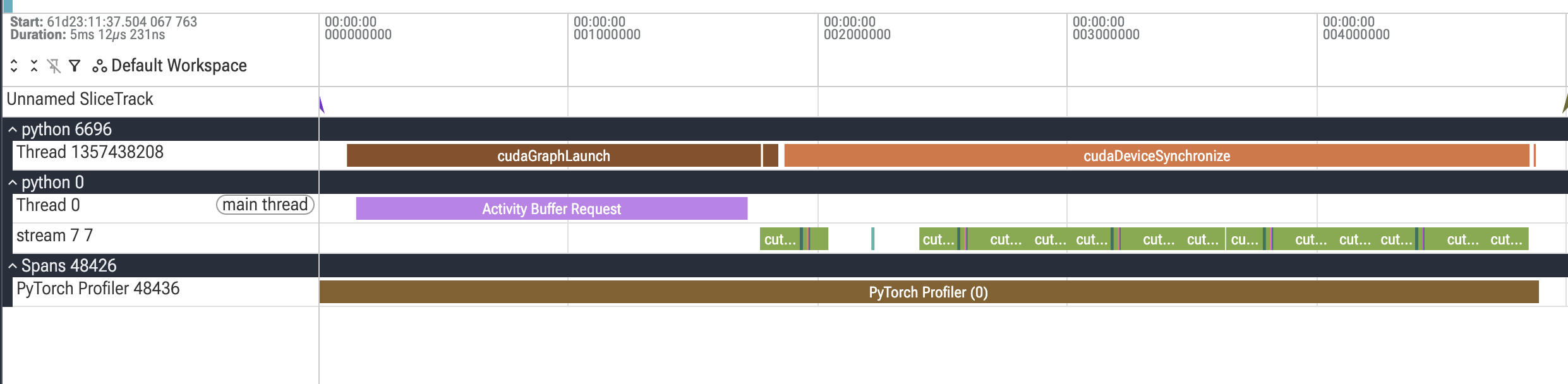
Before annotations: All kernels appear on a single stream with auto-generated names, making it difficult to understand which operations belong to which logical component of your model.
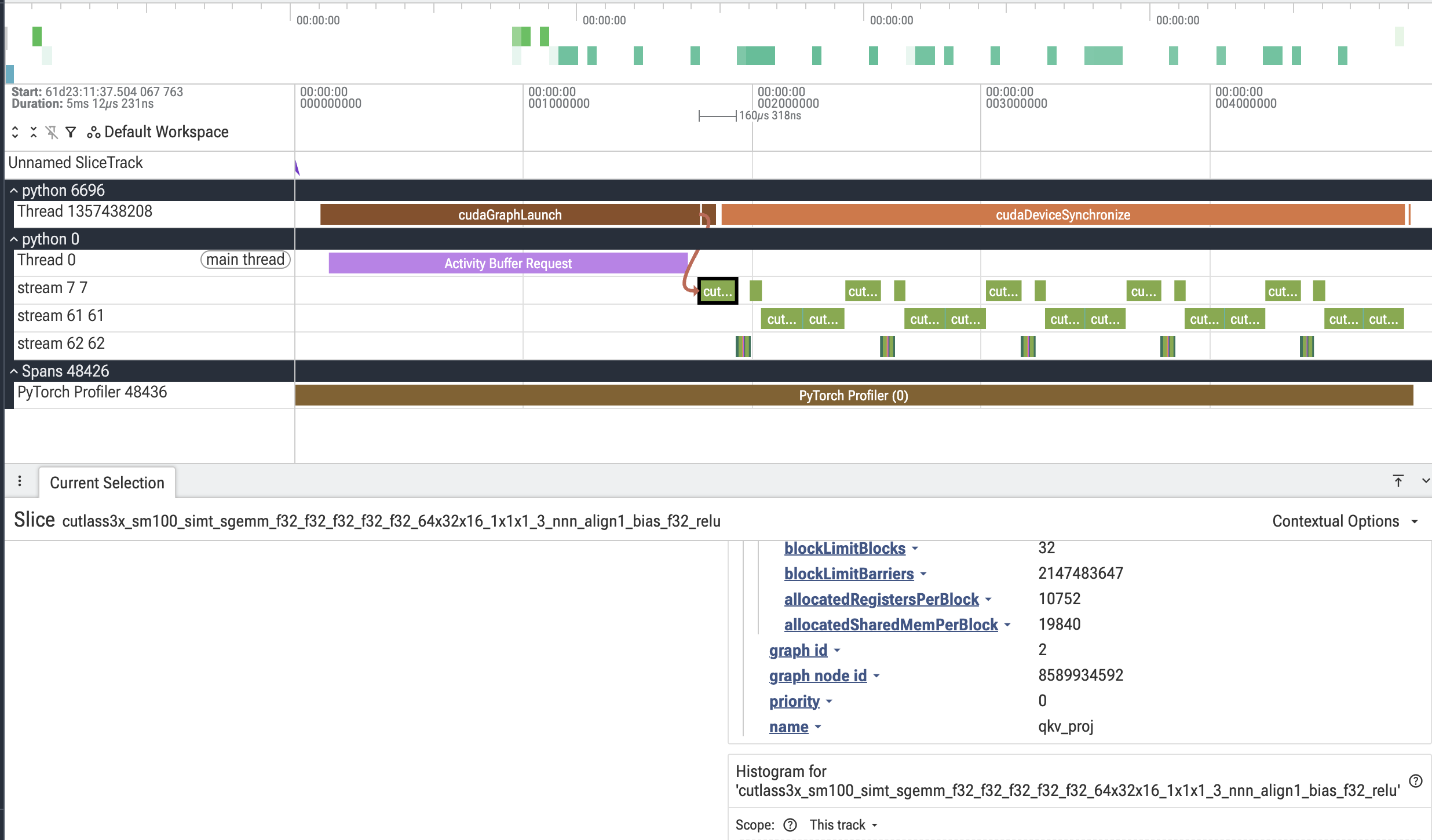
After annotations: Kernels are organized into semantic lanes (streams 61 and 62) with meaningful labels like “attention” and “mlp”, making it easy to identify different components and understand the execution structure.
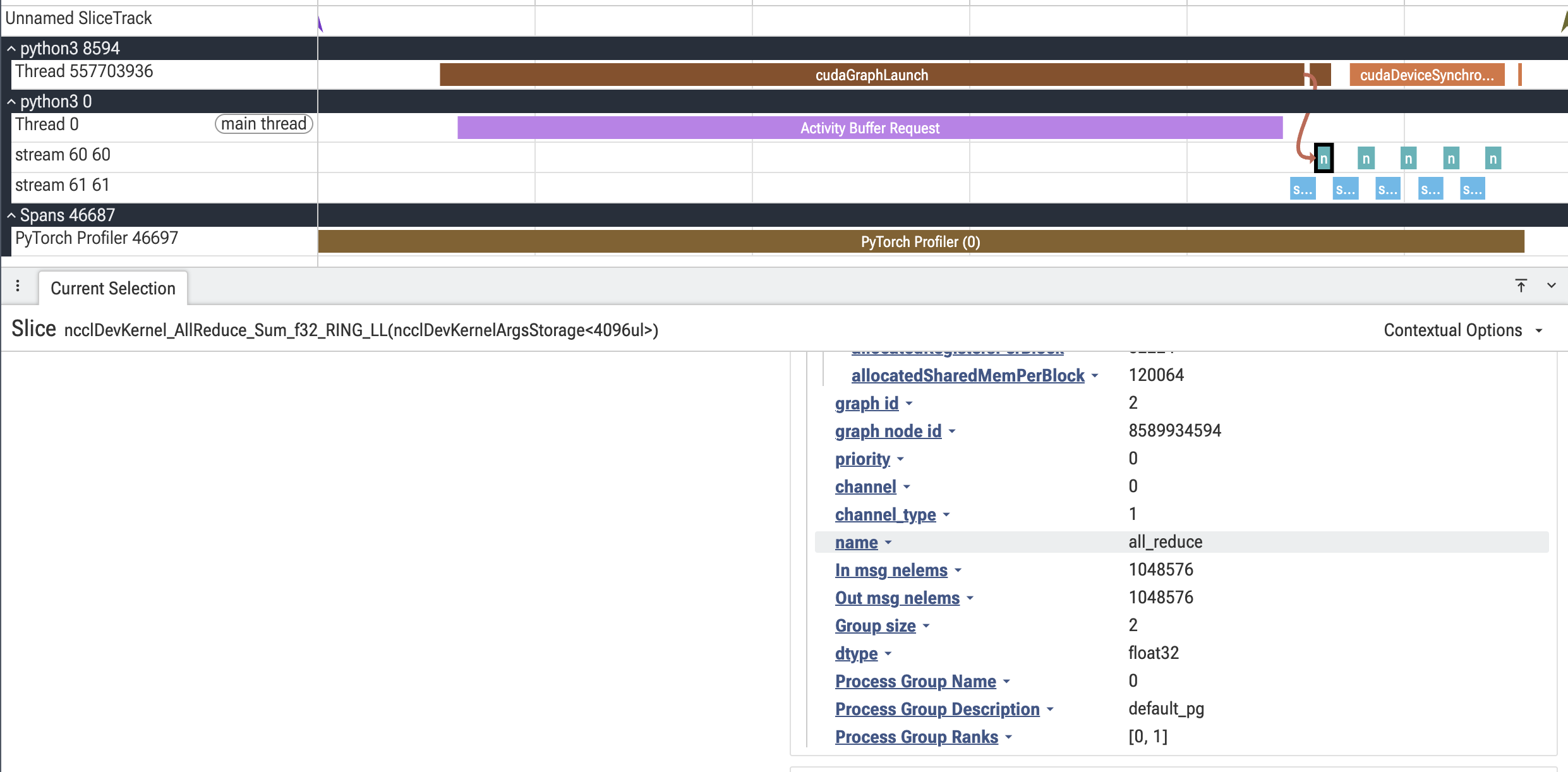
As another example, here is an AllReduce kernel with annotated metadata:
Requirements#
For this tutorial, you’ll need:
PyTorch 2.15+ (use a nightly build until 2.15 is released)
A CUDA GPU
Driver/CUDA-compat >= 13.1 for annotation support
The
cuda-bindingspackage >= 13.1.0 (pip install "cuda-bindings>=13.1.0")
The cuda-bindings package provides the Python bindings for CUDA runtime APIs.
Version 13.1.0+ is required for the cudaGraphNodeGetToolsId API that
enables kernel annotations. If you have an older version, the tutorial will
run but annotations will be disabled with a warning message explaining how
to upgrade.
On older drivers or cuda-bindings versions, the capture and profiling will
still work, but mark_kernels will be a no-op and no semantic lanes will
appear in the final trace.
import gzip
import json
import math
import os
from collections import Counter
from pathlib import Path

import torch
import torch.distributed as dist
import torch.multiprocessing
from torch.profiler import profile, ProfilerActivity
from torch.cuda.graph_annotations import get_kernel_annotations, is_available, mark_kernels
from torch.cuda._graph_annotations import get_stream_for_pg, mark_stream
Building a Model#
Let’s create a simple transformer block as our example model. We’ll annotate different parts of the computation (QKV projection, attention, output projection, MLP) to see them as separate lanes in the profiler.
def build_transformer_block():
    """Create a simple transformer block with parameters."""
    device = "cuda"
    torch.manual_seed(0)

    # Model dimensions
    batch_size, seq_len, dim, num_heads = 4, 256, 1024, 8
    head_dim = dim // num_heads

    # Initialize parameters
    params = {
        "x": torch.randn(batch_size, seq_len, dim, device=device),
        "Wqkv": torch.randn(dim, 3 * dim, device=device) / math.sqrt(dim),
        "Wo": torch.randn(dim, dim, device=device) / math.sqrt(dim),
        "W1": torch.randn(dim, 4 * dim, device=device) / math.sqrt(dim),
        "W2": torch.randn(4 * dim, dim, device=device) / math.sqrt(4 * dim),
    }

    def forward():
        """Forward pass with annotated regions."""
        B, T, D, H = batch_size, seq_len, dim, num_heads
        hd = head_dim

        # Annotate QKV projection
        with mark_kernels({"name": "qkv_proj"}):
            qkv = params["x"] @ params["Wqkv"]

        # Reshape for multi-head attention
        q, k, v = qkv.split(D, dim=-1)
        q = q.view(B, T, H, hd).transpose(1, 2)
        k = k.view(B, T, H, hd).transpose(1, 2)
        v = v.view(B, T, H, hd).transpose(1, 2)

        # Annotate attention computation (optionally on a custom stream)
        with mark_kernels({"name": "attention", "stream": 62}):
            scores = (q @ k.transpose(-1, -2)) / math.sqrt(hd)
            attn = torch.softmax(scores, dim=-1)
            ctx = (attn @ v).transpose(1, 2).reshape(B, T, D)

        # Annotate output projection
        with mark_kernels({"name": "out_proj"}):
            o = ctx @ params["Wo"]

        # Annotate MLP (on another custom stream)
        with mark_kernels({"name": "mlp", "stream": 61}):
            return torch.nn.functional.gelu(o @ params["W1"]) @ params["W2"]

    return forward
The mark_kernels Context Manager#
The key API is mark_kernels(), which takes a dictionary with:
name: A string label stored in the kernel event’sargs(also used as the lane name when a custom stream is assigned)stream(optional): A virtual stream ID for visualization
Any CUDA kernels launched within the context will be tagged with these
annotations. When we export the profiler trace with graph_lanes="all",
these tags organize kernels into custom lanes. The stream IDs control only
visualization; they do not change where the kernels execute.
Capturing a CUDA Graph with Annotations#
To capture a graph with annotations enabled, we pass
enable_annotations=True to torch.cuda.graph(). This automatically
handles the annotation lifecycle: enabling, resolving, and remapping.
def capture_graph_with_annotations(model_fn):
    """Capture the model into a CUDA graph with annotations enabled."""
    # Warm up on a side stream before capture
    warmup_stream = torch.cuda.Stream()
    warmup_stream.wait_stream(torch.cuda.current_stream())

    with torch.cuda.stream(warmup_stream):
        for _ in range(3):
            model_fn()

    torch.cuda.current_stream().wait_stream(warmup_stream)

    # Capture with annotations enabled
    graph = torch.cuda.CUDAGraph()
    with torch.cuda.graph(graph, enable_annotations=True):
        output = model_fn()

    num_annotations = len(get_kernel_annotations())
    print(f"Captured graph with {num_annotations} annotated nodes")

    return graph, output
Profiling the Graph#
After capturing the graph, we replay it a few times to warm up, then profile
subsequent replays. Pass the recorded annotations directly to
export_chrome_trace() to include them in the exported kernel events.
We also export a raw trace from the same profile for comparison.
cuda_graph_annotations selects the Python exporter automatically when the
mapping is nonempty. We explicitly select it for both exports so they also
work with an empty mapping. Both files can be opened in https://ui.perfetto.dev/.
def profile_graph(graph, output_dir):
    """Profile graph replays and export raw and annotated traces."""
    output_dir = Path(output_dir)
    output_dir.mkdir(exist_ok=True, parents=True)

    # Warm up replays
    for _ in range(3):
        graph.replay()
    torch.cuda.synchronize()

    # Profile several replays
    with profile(activities=[ProfilerActivity.CPU, ProfilerActivity.CUDA]) as prof:
        for _ in range(5):
            graph.replay()
        torch.cuda.synchronize()

    raw_trace_path = output_dir / "trace_raw.json.gz"
    prof.export_chrome_trace(str(raw_trace_path), use_python_export=True)
    print(f"Saved raw trace to {raw_trace_path}")

    annotations = get_kernel_annotations()
    annotated_path = output_dir / "trace_annotated.json.gz"
    prof.export_chrome_trace(
        str(annotated_path),
        use_python_export=True,
        cuda_graph_annotations=annotations,
        graph_lanes="all" if annotations else "none",
    )
    print(f"Saved annotated trace to {annotated_path}")

    return raw_trace_path, annotated_path
Choosing the Trace Layout#
graph_lanes="all" places graphed events with a stream annotation on
that display lane. Other graphed events go to default_stream (7 by
default). Moved events retain their actual execution stream in
args["original_stream"]. This groups attention on lane 62 and MLP on
lane 61 in our example.
To keep the recorded stream layout, omit graph_lanes or set it to
"none". Annotation metadata is still included in each matching event’s
args, and any annotated stream is stored as args["annotated_stream"].
This is useful when inspecting concurrency on the original streams.
An empty annotation mapping is treated as no annotations. Since
graph_lanes="all" requires a nonempty mapping, the example uses
"none" when annotation support is unavailable.
Keep the captured graph alive until export finishes: destroying or resetting it removes its entries from the live annotation registry. There is no need to save annotations to a separate file or post-process the exported trace.
Comparing Before and After#
To see the impact of annotations, let’s count how kernels are distributed across thread IDs (which represent visualization lanes in the trace).
def compare_traces(raw_trace, annotated_trace):
    """Compare kernel distribution before and after annotation."""
    def count_lanes(trace):
        """Count kernels per lane (tid)."""
        counter = Counter(
            event["tid"]
            for event in trace["traceEvents"]
            if event.get("cat") == "kernel"
        )
        return dict(sorted(counter.items()))

    raw_lanes = count_lanes(raw_trace)
    annotated_lanes = count_lanes(annotated_trace)

    print("\n" + "="*60)
    print("BEFORE annotation - kernels per lane (tid -> count):")
    for tid, count in raw_lanes.items():
        print(f"  Stream {tid}: {count} kernels")

    print("\nAFTER annotation - kernels per lane (tid -> count):")
    for tid, count in annotated_lanes.items():
        print(f"  Stream {tid}: {count} kernels")
    print("="*60)
Putting It All Together#
Now let’s run the complete workflow: build a model, capture it with annotations, profile it, and export the annotated trace.
def main():
    """End-to-end CUDA graph annotation and profiling demo."""
    if not torch.cuda.is_available():
        raise SystemExit("CUDA required for this tutorial")

    # Check if annotation support is available
    # PyTorch will log a warning if cuda-bindings version is too old
    supported = is_available()
    print(f"Annotation support available: {supported}")
    if not supported:
        print("NOTE: Annotation API not available.")
        print("This could be due to:")
        print("  - Driver/CUDA-compat < 13.1")
        print("  - Outdated cuda-bindings (check PyTorch warnings above)")
        print("Annotations will not be recorded, but the demo will still run.")
        print("The exported trace will keep the recorded stream layout.\n")

    output_dir = Path("traces")

    # Build the model
    print("\n1. Building transformer block model...")
    model_fn = build_transformer_block()

    # Capture graph with annotations
    print("\n2. Capturing CUDA graph with annotations...")
    graph, output = capture_graph_with_annotations(model_fn)

    print("\n3. Profiling graph replays and exporting traces...")
    raw_trace_path, annotated_path = profile_graph(graph, output_dir)

    print("\n4. Comparing traces...")
    with gzip.open(raw_trace_path, "rt") as f:
        raw_trace = json.load(f)
    with gzip.open(annotated_path, "rt") as f:
        annotated_trace = json.load(f)
    compare_traces(raw_trace, annotated_trace)

    # Summary
    print("\n" + "="*60)
    print("SUMMARY")
    print("="*60)
    print(f"Raw trace:       {raw_trace_path}")
    print(f"Annotated trace: {annotated_path}")
    print("\nOpen the annotated trace in https://ui.perfetto.dev/ to visualize")
    print("the semantic kernel lanes.")
    print("="*60)

# Example output:
# if __name__ == "__main__":
#     main()
#
# Annotation support available: True
#
# 1. Building transformer block model...
#
# 2. Capturing CUDA graph with annotations...
# Captured graph with 13 annotated nodes
#
# 3. Profiling graph replays and exporting traces...
# Saved raw trace to traces/trace_raw.json.gz
# Saved annotated trace to traces/trace_annotated.json.gz
#
# 4. Comparing traces...
#
# ============================================================
# BEFORE annotation - kernels per lane (tid -> count):
#   Stream 7: 65 kernels
#
# AFTER annotation - kernels per lane (tid -> count):
#   Stream 7: 10 kernels
#   Stream 61: 15 kernels
#   Stream 62: 40 kernels
# ============================================================
#
# ============================================================
# SUMMARY
# ============================================================
# Raw trace:       traces/trace_raw.json.gz
# Annotated trace: traces/trace_annotated.json.gz
#
# Open the annotated trace in https://ui.perfetto.dev/ to visualize
# the semantic kernel lanes.
# ============================================================
Recording Logical Streams with mark_stream#
When your computation already uses multiple CUDA streams, mark_stream
switches to a stream and records a logical lane ID for its kernels. This
helper currently lives in the private torch.cuda._graph_annotations
module. Use mark_kernels with an explicit stream field when you only
want to change the display layout, as in the transformer example above.
The block below runs two independent projections on separate CUDA streams,
then combines their results. Each side stream waits for the current stream
inside its mark_stream scope. These waits make the side streams join the
capture before launching work. The current stream waits for both branches
before reading their outputs and ending capture. mark_stream does not
insert these dependencies for you.
def build_multistream_block():
    """Create two projections on separate annotated CUDA streams."""
    x = torch.randn(1024, 1024, device="cuda")
    left_weight = torch.randn_like(x)
    right_weight = torch.randn_like(x)
    left = torch.empty_like(x)
    right = torch.empty_like(x)
    left_stream = torch.cuda.Stream()
    right_stream = torch.cuda.Stream()

    def forward():
        current_stream = torch.cuda.current_stream()
        with mark_stream(left_stream, "left_projection"):
            left_stream.wait_stream(current_stream)
            torch.mm(x, left_weight, out=left)

        with mark_stream(right_stream, "right_projection"):
            right_stream.wait_stream(current_stream)
            torch.mm(x, right_weight, out=right)

        current_stream.wait_stream(left_stream)
        current_stream.wait_stream(right_stream)
        with mark_kernels("combine"):
            return left + right

    return forward
Reuse the capture and profiling helpers to export this graph. With
graph_lanes="all", the projections appear on distinct logical lanes
named left_projection and right_projection, even if graph replay
schedules them on different hardware streams. The combine kernel goes
to the default lane, 7. Moved events retain args["original_stream"].
Lane IDs are assigned automatically and may vary depending on which streams
have already been marked. Reusing the same stream reuses its lane ID. Passing
the current stream to mark_stream adds the label without assigning a new
lane. With graph_lanes="none", the original layout is preserved and the
recorded lane IDs appear in args["annotated_stream"] instead.
def stream_annotation_demo():
    """Capture and profile the two projections with logical stream lanes."""
    model_fn = build_multistream_block()
    graph, output = capture_graph_with_annotations(model_fn)
    _, annotated_path = profile_graph(graph, "traces_streams")
    return annotated_path
Run stream_annotation_demo() and open
traces_streams/trace_annotated.json.gz in https://ui.perfetto.dev/.
Annotating Communication Collectives#
In eager mode the profiler automatically intercepts NCCL collectives and records rich metadata: collective type, input/output message sizes, the process group, its size, and the participating ranks.
Under CUDA graphs that automatic interception stops working. The collective is
captured once and then replayed as an opaque kernel node. The profiler cannot
intercept graph replay, so it has nothing to attach the NCCL metadata to. The
kernels still show up in the trace (e.g., ncclDevKernel_AllReduce_Sum_f32_RING_LL),
but they are opaque: you cannot tell what collective type it is, how many bytes
moved, or which process group it belongs to.
Annotations close this gap. By wrapping the collective in mark_kernels
with the same fields the profiler auto-attaches in eager mode, we manually
re-attach that metadata to the graphed kernel. After export, a
graphed collective reads just like an eager one. The helper below builds the
metadata dict; using the field names the profiler uses in eager
(In msg nelems, Group size, Process Group Name, …) keeps the
annotated trace consistent with non-graphed traces.
def annotate_collective(collective_name, input_tensor, output_tensor, group=None):
    """Annotate a collective with the metadata eager NCCL traces expose.

    Returns a ``mark_kernels`` context manager. Any kernels launched inside
    (i.e. the collective) are tagged with the collective type, message sizes,
    dtype, and the process group's name/description/ranks, and placed on a
    dedicated lane keyed by the process group so comms are visually separated
    from compute.

    The field names match the keys the profiler records for eager collectives
    (``In msg nelems``, ``Group size``, ``Process Group Name``, ...), so an
    annotated graphed collective reads exactly like a non-graphed one.
    """
    pg = group if group is not None else (dist.group.WORLD if dist.is_initialized() else None)
    ranks = dist.get_process_group_ranks(pg) if pg is not None else [0]
    group_name = getattr(pg, "group_name", "default")
    group_desc = getattr(pg, "group_desc", "default")

    # NCCL always uses its own internal stream, so key the lane on the process
    # group (name + description) and give it a stable id (>= 60).
    pg_key = f"{group_name}_{group_desc}"
    annotation = {
        "name": collective_name,
        "In msg nelems": input_tensor.numel(),
        "Out msg nelems": output_tensor.numel(),
        "Group size": len(ranks),
        "dtype": str(input_tensor.dtype).replace("torch.", ""),
        "Process Group Name": group_name,
        "Process Group Description": group_desc,
        "Process Group Ranks": ranks,
        "stream": get_stream_for_pg(pg_key),
    }
    return mark_kernels(annotation)
A Block That Mixes Compute and Communication#
A tensor- or data-parallel layer interleaves matmuls with collectives. Here
the projection output is all-reduced across the group, mirroring the comm in
a tensor-parallel linear. The collective is annotated with
annotate_collective and lands on its own lane.
def build_comm_block(group=None):
    """Create a compute + collective block annotated for profiling."""
    device = "cuda"
    torch.manual_seed(0)
    dim = 1024
    params = {
        "x": torch.randn(4, 256, dim, device=device),
        "W": torch.randn(dim, dim, device=device) / math.sqrt(dim),
    }

    def forward():
        with mark_kernels({"name": "proj", "stream": 61}):
            h = params["x"] @ params["W"]

        # All-reduce the projection output across the group (e.g. tensor
        # parallel). all_reduce is in-place, so the input and output tensors
        # are the same. The annotation re-attaches the NCCL metadata that a
        # CUDA graph would otherwise drop.
        if dist.is_available() and dist.is_initialized():
            with annotate_collective("all_reduce", h, h, group):
                dist.all_reduce(h)
        return h

    return forward
Running the Communication Demo#
WORLD_SIZE = 2

def init_pg(rank, world_size):
    """Initialize a NCCL group for one rank of the spawned demo."""
    os.environ["MASTER_ADDR"] = "127.0.0.1"
    os.environ["MASTER_PORT"] = "29500"
    os.environ["RANK"] = str(rank)
    os.environ["WORLD_SIZE"] = str(world_size)
    # Use loopback interface for single-node setup
    os.environ["NCCL_SOCKET_IFNAME"] = "lo"
    dist.init_process_group("nccl", rank=rank, world_size=world_size)
    torch.cuda.set_device(rank)

def _comm_worker(rank, world_size):
    """Per-rank worker: build, capture, profile, and (on rank 0) export."""
    init_pg(rank, world_size)

    output_dir = Path("traces_comm")

    if rank == 0:
        print("\nBuilding compute + collective block...")
    model_fn = build_comm_block()

    if rank == 0:
        print("Capturing CUDA graph with annotations...")
    graph, _ = capture_graph_with_annotations(model_fn)

    # Every rank participates in the collective during profiling, but only
    # rank 0 exports the traces.
    if rank == 0:
        _, annotated_path = profile_graph(graph, output_dir)
        with gzip.open(annotated_path, "rt") as f:
            annotated_trace = json.load(f)

        # Print the args of the annotated collective kernel(s) to show that the
        # eager-style metadata is now attached to the graphed comm.
        print("\nAnnotated collective kernels (metadata restored):")
        for event in annotated_trace["traceEvents"]:
            args = event.get("args", {})
            if args.get("In msg nelems") is not None:
                print(f"  {event.get('name', '?')[:40]}")
                for key in (
                    "In msg nelems",
                    "Out msg nelems",
                    "Group size",
                    "dtype",
                    "Process Group Name",
                    "Process Group Description",
                    "Process Group Ranks",
                    "stream",
                ):
                    if key in args:
                        print(f"      {key}: {args[key]}")
        print(f"\nAnnotated trace: {annotated_path}")
    else:
        # Match rank 0's warmup + profiled replays so the collective completes.
        for _ in range(3):
            graph.replay()
        torch.cuda.synchronize()
        for _ in range(5):
            graph.replay()
        torch.cuda.synchronize()

    # Release captured NCCL work after export and before destroying the group.
    graph.reset()
    dist.destroy_process_group()

def comm_annotation_demo():
    """Spawn a ``world_size=2`` group and surface the comm metadata."""
    if not (dist.is_available() and torch.cuda.is_available()):
        print("Distributed/NCCL unavailable; skipping comm annotation demo.")
        return
    if torch.cuda.device_count() < WORLD_SIZE:
        print(f"Need {WORLD_SIZE} GPUs for the comm demo; skipping.")
        return

    torch.multiprocessing.spawn(
        _comm_worker, args=(WORLD_SIZE,), nprocs=WORLD_SIZE, join=True
    )

# Example output (2 GPUs):
# if __name__ == "__main__":
#     comm_annotation_demo()
#
# Building compute + collective block...
# Capturing CUDA graph with annotations...
# Captured graph with 3 annotated nodes
# Saved raw trace to traces_comm/trace_raw.json.gz
# Saved annotated trace to traces_comm/trace_annotated.json.gz
#
# The all_reduce runs a real NCCL kernel
# (``ncclDevKernel_AllReduce_Sum_f32_RING_LL``) across the two ranks:
#
# Annotated collective kernels (metadata restored):
#   ncclDevKernel_AllReduce_Sum_f32_RING_LL
#       In msg nelems: 1048576
#       Out msg nelems: 1048576
#       Group size: 2
#       dtype: float32
#       Process Group Name: 0
#       Process Group Description: default_pg
#       Process Group Ranks: [0, 1]
#       stream: 60
#
# In the trace viewer, the all-reduce sits on its own dedicated comm lane
# (stream 60), and selecting it shows the collective type, message sizes, group,
# and ranks -- the same fields you would see in an eager trace, now recovered
# for a CUDA-graphed collective. This metadata is LOST without annotations.
Performance Considerations#
Kernel annotations add minimal overhead:
Annotation marking happens during graph capture (one-time cost)
Graph replay performance is identical to unannotated graphs
Annotations are added during trace export, after profiling finishes
The main cost is the profiling itself, which you would do anyway when optimizing performance. Annotations simply make the profiler output more useful by adding semantic structure.
Troubleshooting#
No annotations in the trace?
Check that your driver/CUDA-compat >= 13.1
Verify that
enable_annotations=Truewas passed totorch.cuda.graph()Ensure
cuda-bindings>=13.1.0is installedPass
cuda_graph_annotations=get_kernel_annotations()toexport_chrome_trace()while the graph is still alive
Annotations not showing up in specific kernels?
Some operations may not launch kernels (e.g., tensor views)
Only kernels launched within the
mark_kernelscontext are annotatedVerify the operation actually produces CUDA kernels using
torch.profiler
Conclusion#
CUDA graph kernel annotations provide a powerful way to add semantic structure to your profiling traces. By marking logical components of your model during graph capture and including these annotations during export, you can create visualizations that make it much easier to understand and optimize complex CUDA graph executions.
Key takeaways:
Use
mark_kernels()to label regions during graph captureUse
mark_stream()to record logical lanes when switching CUDA streamsEnable annotations with
enable_annotations=TrueAnnotate communication collectives to recover the NCCL metadata (collective type, message size, group, rank) that CUDA graphs drop but eager traces expose
Pass annotations directly to
export_chrome_trace()Use
graph_lanes="all"to organize graphed kernels into semantic lanesView results in https://ui.perfetto.dev/ for intuitive visualization
This technique is especially valuable for large models with many components, distributed training setups, or any scenario where understanding the execution structure is critical for performance optimization.
Total running time of the script: (0 minutes 0.007 seconds)