AOTInductor Intermediate Value Debug Printer#
Created On: Sep 30, 2025 | Last Updated On: Sep 30, 2025
This is a user manual on how to use AOT Inductor Intermediate Value Debug Printer tool which is a utility tool that can help pinpoint CUDA IMA kernels / numerical discrepancies when uses AOT Inductor to compile a PyTorch model.
The main functionality of this tool is to automatically print out / or dump the value info of all intermediate tensor arguments before and after each kernel launch call in AOT Inductor.
How to use#
The debug printer can be configured via environment variable. The following flags are both supported to run with internal fbcode buck commands and OSS.
All configurations are defined here: torch/_inductor/config.py
    # options for debug printing/saving for intermediate tensor values for aot inductor

    0: disable debug dumping
    1: enable saving intermediate tensor values
    2: enable printing intermediate tensor values
    3: enable printing kernel names only (useful for pinpointing troublesome kernels)
To enable default mode debug printing:
Add flag
AOT_INDUCTOR_DEBUG_INTERMEDIATE_VALUE_PRINTER=2(PRINT_ONLY mode) for default printing all supported kernel tensor arg values.Add flag
AOT_INDUCTOR_FILTERED_KERNELS_TO_PRINT={kernel_name_1, kernel_name_2,...}for selectively printing tensor values associated with the specified kernels. (suggest to do a run with generating full printing logs first)
Sample command:
AOT_INDUCTOR_FILTERED_KERNELS_TO_PRINT="aoti_torch_cuda_addmm_out" AOT_INDUCTOR_DEBUG_INTERMEDIATE_VALUE_PRINTER=2 TORCH_LOGS="+inductor, output_code" python test/inductor/test_aot_inductor.py -k test_addmm_cuda
To enable pinpoint the problematic kernel name only: (Especially useful in CUDA IMA debugging)
Add flag
AOT_INDUCTOR_DEBUG_INTERMEDIATE_VALUE_PRINTER=3(PRINT_KERNEL_NAME_ONLY mode) no tensor numerical values will be dumped.
Sample command:
AOT_INDUCTOR_DEBUG_INTERMEDIATE_VALUE_PRINTER=3 TORCH_LOGS="+inductor, output_code" python test/inductor/test_aot_inductor.py -k test_addmm_cuda
To enable save the intermediate tensor values:
Useful when you want to repro the error in a standalone kernel debugging repro. The saved intermediate tensor values can be used as debugging inputs to the problematic kernel.
Set
AOT_INDUCTOR_DEBUG_INTERMEDIATE_VALUE_PRINTER=1(SAVE_ONLY mode) for default saving all supported kernel tensor arg values to.ptin a tmp folder.Similarly, add
AOT_INDUCTOR_FILTERED_KERNELS_TO_PRINT={kernel_name_1, kernel_name_2,...}for selectively saving tensor values associated with the specified kernels.
Sample command:
AOT_INDUCTOR_FILTERED_KERNELS_TO_PRINT="triton_poi_fused_0" AOT_INDUCTOR_DEBUG_INTERMEDIATE_VALUE_PRINTER=1 TORCH_LOGS="+inductor, output_code" python test/inductor/test_aot_inductor.py -k test_addmm_cuda
The saved tensor values will be dumped in a format:
<before/after_launch>_<kernel_name>_<arg_name>_<device>.ptThe dumped
.pttensors can be further loaded and used like this:def _load_tensor(path): return torch.load(path, weights_only=True) tensor = _load_tensor("../tmp/aoti_torch/before_launch_aoti_torch_cuda_addmm_out_buf1_cuda:0.pt") # Simply print tensor to view the full value print(tensor)
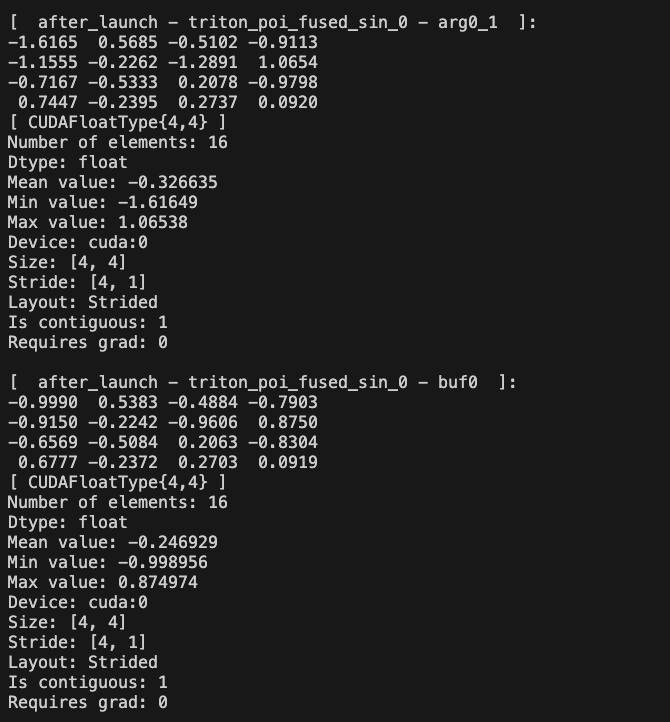
Example Outputs#
Before launch tensor stats:
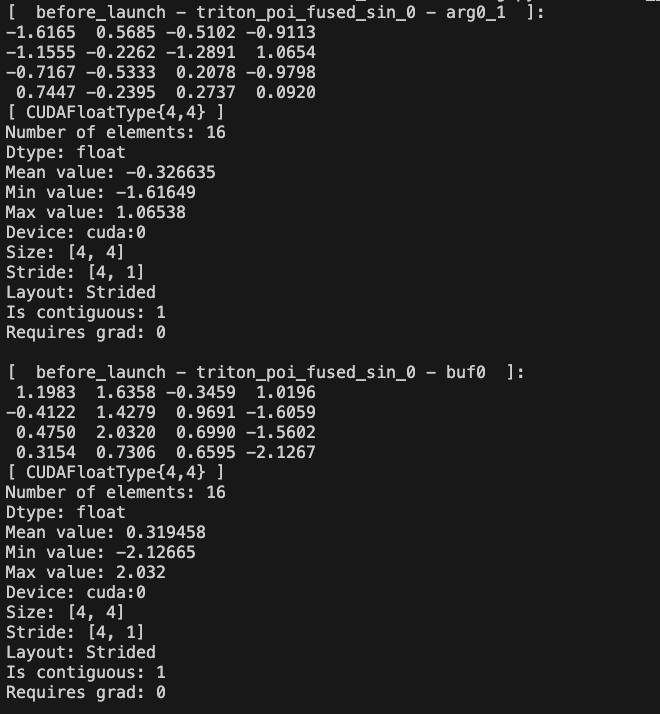
After launch tensor stats: