
Using ExecuTorch on Android#
🚀 Quick Start: New to ExecuTorch ? Jump to Using AAR from Maven Central for the fastest setup, then see the Runtime Integration example.
For Android applications, ExecuTorch provides Java/Kotlin bindings and platform integration in an AAR. You can instead use the C++ APIs from Android native code; see Cross-Compiling for Android.
Warning
The Java/Kotlin Module and task-level APIs are experimental and may change or
be removed without notice. Android applications can use the stable C++ runtime
through native code when API stability is required.
Installation#
Choose your installation method:
Maven Central (recommended): Easiest for most developers
Direct AAR file: For specific versions or offline development
Build from source: For custom backends or contributions
ExecuTorch Android libraries are packaged into an Android library (AAR),
executorch.aar, for generic and task-level use cases. Prebuilt artifacts are
published to Maven Central and S3. Users can also build the AAR from source.
Contents of library#
The AAR artifact contains the Java library for users to integrate with their Java/Kotlin application code, as well as the corresponding JNI library (.so file), which is loaded by the Java code during initialization.
JNI contains the JNI binding for the corresponding Java code, and ExecuTorch native library, including
Core ExecuTorch runtime libraries
XNNPACK backend
Portable kernels
Optimized kernels
Quantized kernels
LLaMa-specific Custom ops library.
The default XNNPACK AAR comes with
arm64-v8aandx86_64variants.
The AAR library can be used across form factors, including phones, tablets,
and TV boxes, because it does not contain UI components. Backend-specific
packages may support fewer ABIs; for example, the QNN release AAR is
arm64-v8a only.
Using AAR from Maven Central#
✅ Recommended for most developers
ExecuTorch is available on Maven Central.
Add org.pytorch:executorch-android to your app’s Gradle dependencies. Replace
X.Y.Z with a version from Maven Central that matches the ExecuTorch release
used to export the model:
// app/build.gradle.kts
val executorchVersion = "X.Y.Z"

dependencies {
    implementation("org.pytorch:executorch-android:$executorchVersion")
}
Choose a version on Maven Central.
Click the screenshot below to watch the demo video on how to add the package and run a simple ExecuTorch model with Android Studio.
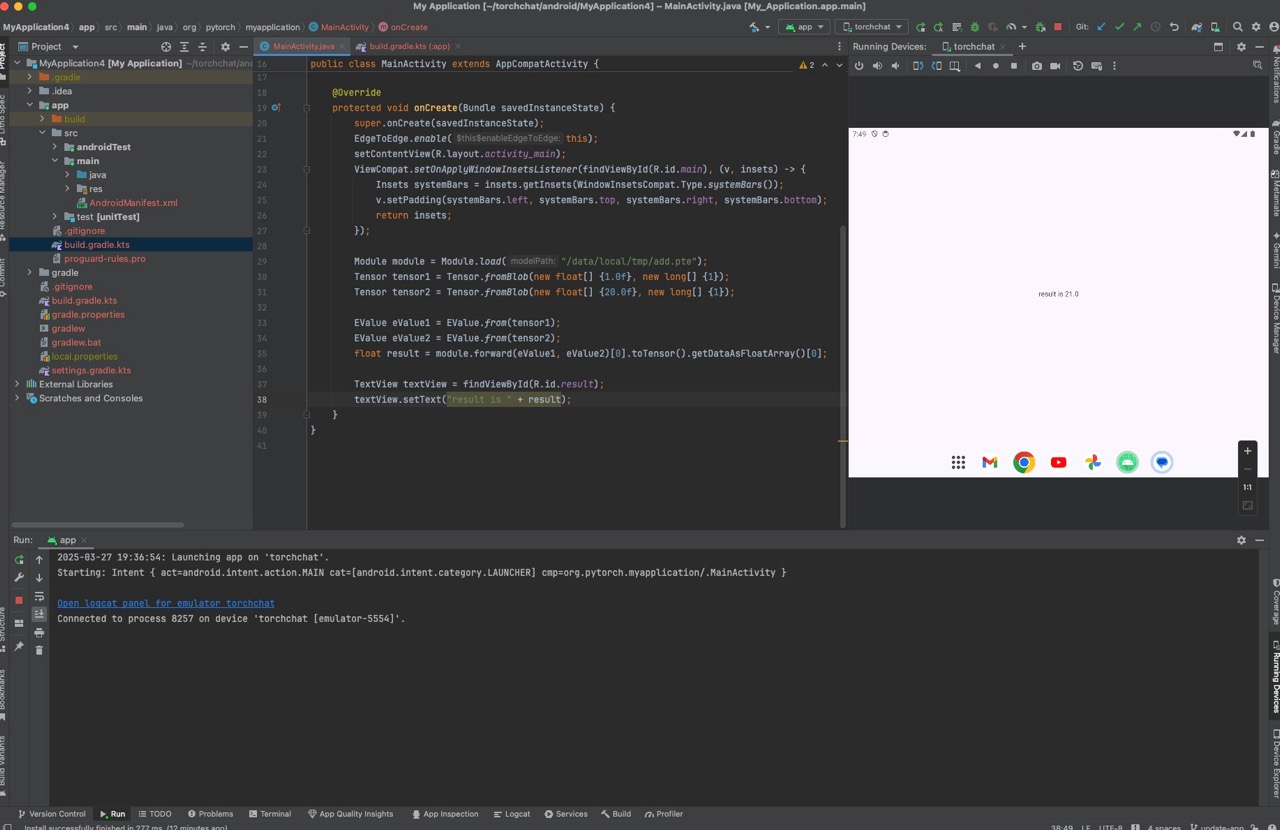
Using AAR file directly#
You can also add an AAR file directly. From release 1.0.0 onward, AARs use
release/VERSION-FLAVOR/, where VERSION omits the release tag’s leading v
and FLAVOR is xnnpack, qnn, or vulkan. Match the version and backend to
the model export. The QNN flavor also needs the separate
Qualcomm runtime dependency.
For example, download the XNNPACK 1.4.1 artifact and verify its checksum:
curl -fLO https://ossci-android.s3.amazonaws.com/executorch/release/1.4.1-xnnpack/executorch.aar
curl -fLO https://ossci-android.s3.amazonaws.com/executorch/release/1.4.1-xnnpack/executorch.aar.sha256sums
shasum -a 256 -c executorch.aar.sha256sums
Older releases#
Pre-1.0 artifacts use a legacy layout with a leading v and no backend
suffix. Use the exact links below; the 0.5 artifact was published under
v0.5.0-rc3, not v0.5.0.
Release |
AAR |
Checksum |
|---|---|---|
0.7.0 |
||
0.6.0 |
||
0.5.0-rc3 |
Snapshots from main branch#
Current nightly main snapshots use release/snapshot-YYYYMMDD-FLAVOR/.
The scheduled Android release workflow
publishes the xnnpack flavor; other flavors are available only when built
for that date. For example, download the XNNPACK snapshot from 2026-09-14:
curl -fLO https://ossci-android.s3.amazonaws.com/executorch/release/snapshot-20260914-xnnpack/executorch.aar
curl -fLO https://ossci-android.s3.amazonaws.com/executorch/release/snapshot-20260914-xnnpack/executorch.aar.sha256sums
shasum -a 256 -c executorch.aar.sha256sums
We aim to make every daily snapshot available and usable. However, for best stability, please use releases, not snapshots.
Using AAR file#
To add the AAR file to your app: Download the AAR. Add it to your gradle build rule as a file path. An AAR file does not carry the dependency metadata that Maven resolves. Declare the shared dependencies explicitly, and add the QNN runtime dependency for the QNN flavor:
implementation("com.facebook.fbjni:fbjni:0.7.0")
implementation("com.facebook.soloader:nativeloader:0.10.5")
implementation("androidx.core:core-ktx:1.13.1")
implementation("org.jetbrains.kotlin:kotlin-stdlib:1.9.23")
Example usage#
In your app working directory, such as executorch-examples/llm/android/LlamaDemo,
mkdir -p app/libs
cp /path/to/executorch.aar app/libs/executorch.aar
And include it in gradle:
// app/build.gradle.kts
dependencies {
    implementation(files("libs/executorch.aar"))
    implementation("com.facebook.fbjni:fbjni:0.7.0")
    implementation("com.facebook.soloader:nativeloader:0.10.5")
    implementation("androidx.core:core-ktx:1.13.1")
    implementation("org.jetbrains.kotlin:kotlin-stdlib:1.9.23")
}
Now you can compile your app with the ExecuTorch Android library.
Qualcomm QNN dependency#
The 1.4.1-qnn AAR contains the ExecuTorch runtime and QNN backend, but not
Qualcomm’s runtime libraries. In addition to the dependencies above, add the
QNN runtime version used by the
1.4.1 release workflow:
dependencies {
    implementation("com.qualcomm.qti:qnn-runtime:2.51.0")
}
For another release or a custom build, match the QNN runtime to that build’s
SDK version rather than reusing this pin. QNN AARs are arm64-v8a only and
require compatible Qualcomm hardware and a model exported for that target;
see the Qualcomm backend guide.
Building from Source#
./scripts/build_android_library.sh
is a helper script to build the Java library, native library, and packaged AAR.
Install JDK 17, Android SDK Platform 34, and Android NDK r28c (the version used
in ExecuTorch CI). Set ANDROID_SDK to the SDK and
ANDROID_NDK to the NDK root (the directory containing NOTICE).
export ANDROID_SDK=/path/to/android/sdk
export ANDROID_NDK=/path/to/android/sdk/ndk/28.2.13676358
./scripts/build_android_library.sh
The build script passes ANDROID_SDK to Gradle as ANDROID_HOME.
NOTE: Currently, XNNPACK backend is always built with the script.
Optional environment variables#
Optionally, set these environment variables before running build_android_library.sh.
ANDROID_ABIS
Set environment variable ANDROID_ABIS to either arm64-v8a or x86_64 if you only need to build the native library for one ABI only.
export ANDROID_ABIS=arm64-v8a
(Or)
export ANDROID_ABIS=x86_64
Then run the script.
./scripts/build_android_library.sh
EXECUTORCH_CMAKE_BUILD_TYPE
Set environment variable EXECUTORCH_CMAKE_BUILD_TYPE to Release or Debug based on your needs.
Using MediaTek backend
To use MediaTek backend, after installing and setting up the SDK, set NEURON_BUFFER_ALLOCATOR_LIB and NEURON_USDK_ADAPTER_LIB to the corresponding path.
Using Qualcomm AI Engine Backend (Dependencies)
To use Qualcomm AI Engine Backend, ensure your Android app configuration includes the QNN Runtime Maven dependency, and after installing and setting up the SDK, set QNN_SDK_ROOT to the corresponding path.
Using Vulkan Backend
To use Vulkan Backend, set EXECUTORCH_BUILD_VULKAN to ON.
Android Backends#
The following backends are available for Android:
Backend |
Type |
Doc |
|---|---|---|
CPU |
||
NPU |
||
NPU |
||
Arm VGF |
GPU |
|
Samsung Exynos |
NPU / DSP |
|
GPU |
Start with XNNPACK (CPU backend) for maximum compatibility, then add hardware-specific backends for optimization.
Runtime Integration#
First export the test model into your app’s assets from an ExecuTorch source checkout with its Python package installed:
mkdir -p /path/to/app/src/main/assets
python -m test.models.export_program --modules ModuleAdd \
  --outdir /path/to/app/src/main/assets
Android applications cannot normally read files pushed to /data/local/tmp.
Copy the asset to app-private storage before loading it:
import android.app.Activity
import android.os.Bundle
import java.io.File
import org.pytorch.executorch.EValue
import org.pytorch.executorch.Module
import org.pytorch.executorch.Tensor

class MainActivity : Activity() {
    override fun onCreate(savedInstanceState: Bundle?) {
        super.onCreate(savedInstanceState)

        val modelFile = File(filesDir, "ModuleAdd.pte")
        assets.open("ModuleAdd.pte").use { input ->
            modelFile.outputStream().use { output -> input.copyTo(output) }
        }

        val x = Tensor.fromBlob(floatArrayOf(1f, 2f, 3f, 4f), longArrayOf(2, 2))
        val y = Tensor.fromBlob(floatArrayOf(5f, 6f, 7f, 8f), longArrayOf(2, 2))

        Module.load(modelFile.absolutePath).use { module ->
            val outputs = module.forward(EValue.from(x), EValue.from(y), EValue.from(1.0))
            check(outputs[0].toTensor().dataAsFloatArray.contentEquals(
                floatArrayOf(6f, 8f, 10f, 12f)
            ))
        }
    }
}
Please use DeepLabV3AndroidDemo and LlamaDemo for the code examples using ExecuTorch AAR package.
Java API reference#
Please see Java API reference.