TensorDictBase.load_memmap#
- classmethod TensorDictBase.load_memmap(prefix: str | Path, device: device | None = None, non_blocking: bool = False, *, out: TensorDictBase | None = None, robust_key: bool | None = True, subpath: NestedKey | None = None, mode: str | None = None, num_threads: int = 0, allow_pickle: bool | None = None) Self#
Loads a tensordict that
memmap()orsave()wrote, from a directory or an archive.The leaves of the result read the files lazily: from a directory, each leaf is a
MemoryMappedTensorof its file, and from an archive, each leaf is a view into one memory map of the archive. Only the pages of the leaves that you use are read from disk. The result has the class that was saved (a tensorclass is loaded as that tensorclass), and it is not locked.load()is this method. See Save and load tensordicts.- Parameters:
prefix (str or Path) – the directory to read, or an archive file written by
save(..., archive=True), by a".tdz"prefix, or bypack_memmap().device (device, str or int, optional) – the device of the result. The leaves are copied to it, which reads the files, unless it is the CPU. With
"meta", no file is read: the leaves are meta tensors, which show the structure and size of the data. Defaults toNone, which keeps the leaves on the CPU, memory-mapped.non_blocking (bool, optional) – if
True, does not synchronize the device after the copies todevice. Defaults toFalse.
- Keyword Arguments:
out (TensorDictBase, optional) – a tensordict to load the data into. Its nested tensordicts are reused, but its leaves are replaced by the loaded tensors, so their storage is not reused. Its keys that are not in the saved data are removed. If
outhas a device, the data is loaded on it, and anotherdeviceraises aValueError. To write the data into the storage ofout, useout.update_(TensorDict.load_memmap(prefix, device=device)). Defaults toNone.robust_key (bool, optional) – if
True, reads the percent-encoded file names thatmemmap()writes by default, and falls back to the legacy names of keys that are safe file names. IfFalse, reads the legacy layout only.Noneis the same asTrue. Defaults toTrue.subpath (NestedKey or str, optional) – the nested tensordict to load, as a nested key (
("module", "0")) or as a"/"-separated path ("module/0"). Only that subtree is read, from a directory or an archive. A nested key reaches the entries of a saved tensorclass asobj.get(key)does. Defaults toNone, which loads the whole tensordict.mode (str, optional) – how the files are mapped. With
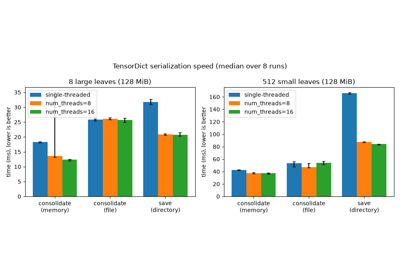
"r", the mapping is copy-on-write: in-place writes into the leaves stay in memory, and the files do not change. With"r+", in-place writes reach the files, and a file that the process cannot write raises aPermissionError. Defaults toNone, which maps an archive as with"r", and each file of a directory as with"r+"if the process can write it, and as with"r"otherwise. See the note below.num_threads (int, optional) – the number of threads that decompress the leaves of a compressed archive. It has no effect on an uncompressed archive or a directory. Defaults to
0, which decompresses them one after the other.allow_pickle (bool, optional) – whether non-tensor data saved with
picklemay be loaded. Pickle can run arbitrary code: passTrueonly for data you trust, andFalsefor other data, which raises aRuntimeErroron pickled data. Defaults toNone, which loads pickled data with aFutureWarning. Starting with TensorDict 0.16, the default will change toFalse. Data saved without pickle loads with any value.
- Returns:
The loaded tensordict, or
outif it is given.- Raises:
ValueError – if
prefixis a file that is not an archive, ifsubpathnames no saved tensordict, or ifmodeis notNone,"r"or"r+".
Note
Load with
mode="r"data that you only read: on some network file systems (for example Lustre), page faults on a shared writable mapping take write locks, so readers on different nodes block each other. On Linux, a copy-on-write mapping counts against the memory commit limit, so a file larger than RAM plus swap can fail to map with"r". With"r",memmap_()without a prefix does not write back toprefix.Note
An archive opened with
mode="r+"must have uncompressed, aligned payloads (as written by tensordict withoutcompression) and no nested tensor. In-place writes do not update the CRC-32 checksums of its entries:load_memmapdoes not check them, but callrefresh_archive_checksums()before you give the archive to a tool that does, such asunzip.Examples
>>> import tempfile
>>> import torch
>>> from tensordict import TensorDict
>>> td = TensorDict(a=torch.zeros(3), nested=TensorDict(b=torch.ones(3)))
>>> with tempfile.TemporaryDirectory() as path:
...     _ = td.memmap(path)
...     loaded = TensorDict.load_memmap(path)
...     print((loaded == td).all(), type(loaded["a"]).__name__)
...     # load one nested tensordict
...     print(TensorDict.load_memmap(path, subpath="nested")["b"])
...     # read the structure without reading the data
...     print(TensorDict.load_memmap(path, device="meta")["a"].device)
True MemoryMappedTensor
MemoryMappedTensor([1., 1., 1.])
meta
With a
FakeTensorModeactive, the leaves are fake tensors and no file is read:>>> from torch._subclasses import FakeTensorMode >>> with tempfile.TemporaryDirectory() as path: ... _ = td.memmap(path) ... with FakeTensorMode(): ... print(type(TensorDict.load_memmap(path)["a"]).__name__) FakeTensor
Every tensordict class and every tensorclass has this method. For the other methods, see Methods by task.