
NXP eIQ Dim Order Support#
The NXP ExecuTorch backend supports two different dimension orders (memory formats):
Contiguous (default, also known as channels first)
Channels last
Note: Any other dimension order will cause a runtime exception.
Why Use Channels Last?#
The Neutron NPU computes on channels last data (NHWC), while ExecuTorch uses channels the first format (NCHW) by default. This mismatch requires extra transpositions during runtime, which can significantly impact performance.
Benefits of using channels last:
Eliminates or reduces runtime data transpositions
Improves inference performance on the Neutron NPU
May align with sensor data formats (e.g., camera sensors often output NHWC)
Implementation Options#
There are two approaches to using the channels last dimension order:
Option 1: Channels Last Inputs (Recommended)#
This approach provides the best performance and often completely eliminates runtime transpositions.
Trade-off: Model inputs must be provided in channels last format instead of the native channels first format.
Example#
# Convert model weights to channels last dimension order
model = YourModel().to(memory_format=torch.channels_last)

# Convert example inputs to channels last dimension order
# This defines the dim order for the model inputs and internal data at runtime
example_inputs = tuple(
    i.to(memory_format=torch.channels_last) for i in your_example_inputs
)

# Export the model using channels last example inputs
exported_program = torch.export.export(model, example_inputs)

# Lower the model using the NXP backend
...
Complete Example#
A full implementation is available in aot_neutron_compile.py.
The following command creates a cifar10_nxp_delegate.pte model with channels last inputs and no transpositions,
compatible with the i.MX RT700 board using MCUXpresso SDK 25.06:
python -m examples.nxp.aot_neutron_compile --quantize \
    --delegate -m cifar10 \
    --use_channels_last_dim_order
For installation details, see NXP eIQ Neutron Backend.
Option 2: Preserve Channels First Inputs#
This approach maintains contiguous/channels first model inputs while potentially improving performance through internal channels last processing.
How it works:
Model inputs remain unchanged (channels first)
An extra operator is inserted at the model’s start to convert inputs to channels last
The model behaves identically from an external perspective
Internal processing may save on runtime transpositions
Example#
class MyModel(nn.Module):
    def forward(self, x):
        # Transform inputs to channels last dimension order
        x = x.to(memory_format=torch.channels_last)

        # Rest of your model definition
        ...


# Convert model weights to channels last dimension order
model = MyModel().to(memory_format=torch.channels_last)

# Export and lower the model using the NXP backend
...
Performance Considerations#
Performance improvement depends on the specific model
In many cases, there may be no significant improvement
Rarely, performance could slightly decrease
Always benchmark both contiguous and channels last variants
Limitations#
4D Input Support Only#
Due to internal limitations of PyTorch, only models with 4D and 5D inputs can take advantage of the channels last dimension order, and only the 4D case is currently supported by the NXP backend. Models processing serial data (with 3D inputs (NCW)) would have to be manually extended to 4D with a spatial dimension of size 1 (NC1W).
Partial Delegation Issues#
Models that are not fully delegated to Neutron may experience runtime issues when using channels last dimension order, including:
Runtime crashes
Incorrect output data
This affects models with partitions running in ExecuTorch edge dialect on the CPU.
Recommendation: Manually verify model correctness by testing the final .pte file and validating outputs.
Fully Delegated Models#
Models that are fully delegated to Neutron should not experience runtime issues with channels last dimension order.
Verifying Full Delegation#
Use one of the following methods to confirm your model is fully delegated:
Method 1: List Graph Nodes#
After lowering your model, inspect the graph nodes:
exec_prog = edge_program_manager.to_executorch()
print(list(exec_prog.exported_program().graph.nodes))
Example output for a fully delegated model (containing no compute aten operators except (de)quantize):
[x, alloc, quantized_decomposed_quantize_per_tensor_default, lowered_module_0, executorch_call_delegate, getitem,
 alloc_1, quantized_decomposed_dequantize_per_tensor_default_1, output_1]
Method 2: Visualize with Model Explorer#
Launch a browser-based visualization of your model:
exec_prog = edge_program_manager.to_executorch()

from executorch.devtools.visualization.visualization_utils import visualize_with_clusters

visualize_with_clusters(exec_prog.exported_program())
Example visualization of a fully delegated model is shown in Figure 1 below (containing no compute aten
operators except (de)quantize):
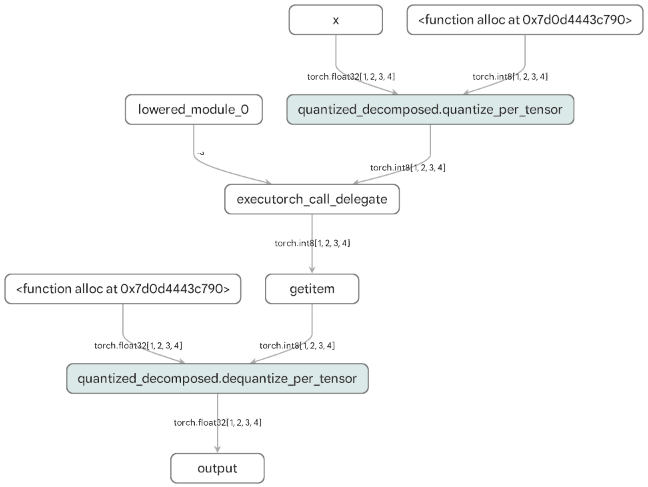
aten operators other than
quantize and dequantize. The entire model is delegated to Neutron via the
`executorch_call_delegate` node.
Summary#
Approach |
Input Format |
Internal Format |
Performance |
Use Case |
|---|---|---|---|---|
Option 1 |
Channels last |
Channels last |
Best |
When you can provide channels last inputs |
Option 2 |
Contiguous |
Channels last |
Variable |
When input format must be preserved |
Default |
Contiguous |
Contiguous |
Baseline |
For non-4D models, or when Option 2 is slower, crashes, or produces incorrect outputs |
Choose the approach that best fits your deployment requirements and always benchmark to verify performance improvements.