
Quantization-Aware Training (QAT)#
Created On: Oct 06, 2026 | Last Updated On: Oct 06, 2026
Quantization-Aware Training (QAT) refers to applying fake quantization during the training or fine-tuning process, such that the final quantized model will exhibit higher accuracies and lower perplexities. Fake quantization refers to rounding the float values to quantized values without actually casting them to dtypes with lower bit-widths, in contrast to post-training quantization (PTQ), which does cast the quantized values to lower bit-width dtypes, e.g.:
# PTQ: x_q is quantized and cast to int8
# scale and zero point (zp) refer to parameters used to quantize x_float
# qmin and qmax refer to the range of quantized values
x_q = (x_float / scale + zp).round().clamp(qmin, qmax).cast(int8)

# QAT: x_fq is still in float
# Fake quantize simulates the numerics of quantize + dequantize
x_fq = (x_float / scale + zp).round().clamp(qmin, qmax)
x_fq = (x_fq - zp) * scale
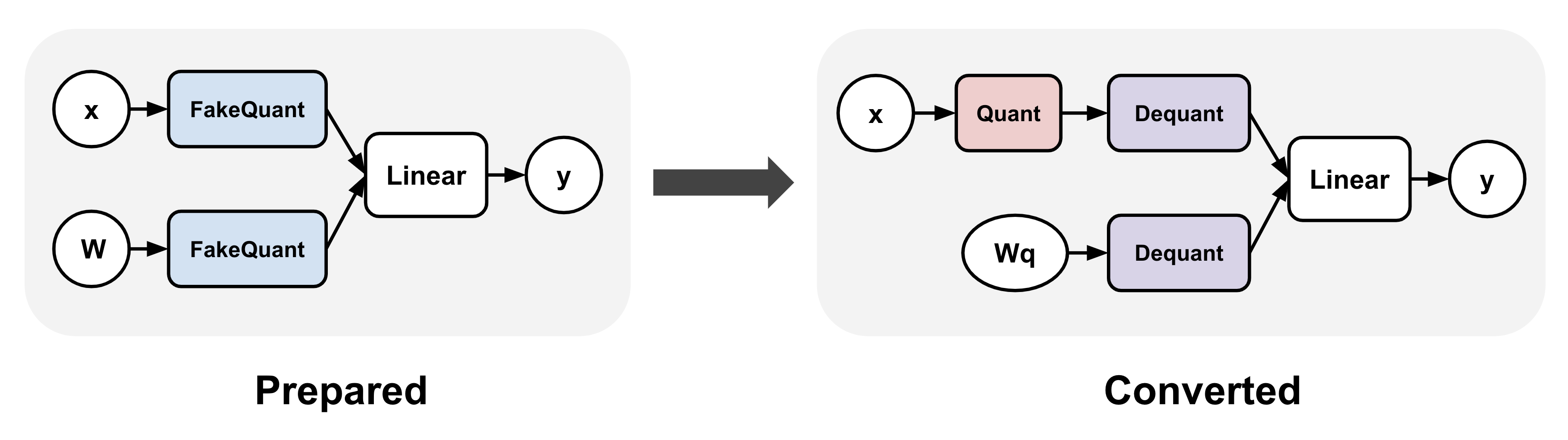
QAT typically involves applying a transformation to your model before and after training. In torchao, these are represented as the prepare and convert steps: (1) prepare inserts fake quantize operations into linear layers, and (2) convert transforms the fake quantize operations to actual quantize and dequantize operations after training, thereby producing a quantized model (dequantize operations are typically fused with linear after lowering). Between these two steps, training can proceed exactly as before.
torchao APIs#
torchao currently supports two QAT APIs, one through the quantize_
API (recommended) and one through the Quantizer classes (legacy). The quantize_ API
allows flexible configuration of quantization settings for both activations and weights,
while the Quantizer classes each hardcode a specific quantization setting.
For example, running QAT on a single GPU:
import torch
from torchtune.models.llama3 import llama3

# Set up smaller version of llama3 to fit in a single GPU
def get_model():
    return llama3(
        vocab_size=4096,
        num_layers=16,
        num_heads=16,
        num_kv_heads=4,
        embed_dim=2048,
        max_seq_len=2048,
    ).cuda()

# Example training loop
def train_loop(m: torch.nn.Module):
    optimizer = torch.optim.SGD(m.parameters(), lr=0.001, momentum=0.9, weight_decay=1e-5)
    loss_fn = torch.nn.CrossEntropyLoss()
    for i in range(10):
        example = torch.randint(0, 4096, (2, 16)).cuda()
        target = torch.randn((2, 16, 4096)).cuda()
        output = m(example)
        loss = loss_fn(output, target)
        loss.backward()
        optimizer.step()
        optimizer.zero_grad()
quantize_ API (recommended)#
The recommended way to run QAT in torchao is through the quantize_ API.
Prepare: The main
QATConfigaccepts a post-training quantization (PTQ) config and automatically infers the corresponding fake quantization configs to use.Convert: quantize the model using the base config provided
Currently only the following PTQ base configs are supported:
For example (most use cases):
from torchao.quantization import quantize_, Int4WeightOnlyConfig
from torchao.quantization.qat import QATConfig

model = get_model()

# prepare: swap `torch.nn.Linear` -> `FakeQuantizedLinear`
base_config = Int4WeightOnlyConfig(group_size=32)
quantize_(model, QATConfig(base_config, step="prepare"))

# train
train_loop(model)

# convert: swap `FakeQuantizedLinear` -> `torch.nn.Linear`, then quantize using `base_config`
quantize_(model, QATConfig(base_config, step="convert"))

# inference or generate
The quantize_ API also allows more general quantization settings that
may not have a corresponding PTQ base config, e.g. for experimentation
purposes. Users can specify custom fake quantization configs for activations
and/or weights. For example, the following usage is numerically equivalent
to the above:
from torchao.quantization import quantize_, Int4WeightOnlyConfig
from torchao.quantization.qat import IntxFakeQuantizeConfig, QATConfig

model = get_model()

# prepare: swap `torch.nn.Linear` -> `FakeQuantizedLinear`
activation_config = IntxFakeQuantizeConfig(torch.int8, "per_token", is_symmetric=False)
weight_config = IntxFakeQuantizeConfig(torch.int4, group_size=32)
qat_config = QATConfig(
    activation_config=activation_config,
    weight_config=weight_config,
    step="prepare",
)
quantize_(model, qat_config)

# train
train_loop(model)

# convert: (not shown, same as before)
To fake quantize embedding in addition to linear, you can additionally call the following with a filter function during the prepare step:
# First apply linear transformation to the model as above
# Then apply weight-only transformation to embedding layers
# (activation fake quantization is not supported for embedding layers)
qat_config = QATConfig(weight_config=weight_config, step="prepare")
quantize_(m, qat_config, filter_fn=lambda m, _: isinstance(m, torch.nn.Embedding))
Quantizer API (legacy)
Alternatively, torchao provides a few hardcoded quantization settings through the following Quantizers, but these may be removed soon:
Int8DynActInt4QATQuantizer (linear), targeting int8 per-token dynamic asymmetric activation + int4 per-group symmetric weight
Int4WeightOnlyQATQuantizer (linear), targeting int4 per-group asymmetric weight using the efficient int4 tinygemm kernel after training)
Int4WeightOnlyEmbeddingQATQuantizer (embedding), targeting int4 per-group symmetric weight
For example:
from torchao.quantization.qat import Int8DynActInt4WeightQATQuantizer
qat_quantizer = Int8DynActInt4WeightQATQuantizer(group_size=32)
model = get_model()

# prepare: insert fake quantization ops
# swaps `torch.nn.Linear` with `Int8DynActInt4WeightQATLinear`
model = qat_quantizer.prepare(model)

# train
train_loop(model)

# convert: transform fake quantization ops into actual quantized ops
# swaps `Int8DynActInt4WeightQATLinear` with `Int8DynActInt4WeightLinear`
model = qat_quantizer.convert(model)

# inference or generate
To use multiple Quantizers in the same model for different layer types, users can also leverage the ComposableQATQuantizer as follows:
from torchao.quantization.qat import (
    ComposableQATQuantizer,
    Int4WeightOnlyEmbeddingQATQuantizer,
    Int8DynActInt4WeightQATQuantizer,
)

quantizer = ComposableQATQuantizer([
    Int8DynActInt4WeightQATQuantizer(groupsize=group_size),
    Int4WeightOnlyEmbeddingQATQuantizer(group_size=group_size),
])

# prepare + train + convert as before
model = qat_quantizer.prepare(model)
train_loop(model)
model = qat_quantizer.convert(model)
Axolotl integration#
Axolotl uses TorchAO to support quantized-aware fine-tuning. You can use the following commands to fine-tune, and then quantize a Llama-3.2-3B model:
axolotl train examples/llama-3/3b-qat-fsdp2.yaml
# once training is complete, perform the quantization step
axolotl quantize examples/llama-3/3b-qat-fsdp2.yaml
# you should now have a quantized model saved in ./outputs/qat_out/quatized
Please see the QAT documentation in axolotl for more details.
Unsloth integration#
Unsloth also leverages TorchAO for quantized-aware fine-tuning. Unsloth’s QAT support can be used with both full and LoRA fine-tuning. For example:
from unsloth import FastLanguageModel

model, tokenizer = FastLanguageModel.from_pretrained(
    "unsloth/Qwen3-4B-Instruct-2507",
    max_seq_len = 2048,
    dtype = torch.bfloat16,
    load_in_4bit = False,
    full_finetuning = False,
)

model = FastLanguageModel.get_peft_model(
    model,
    r = 16,
    target_modules = ["q_proj", "k_proj", "v_proj", "o_proj", "gate_proj", "up_proj", "down_proj",],
    lora_alpha = 16,
    qat_scheme = "int4",
)
For a full notebook example, see this QAT notebook. A QAT-specific notebook is coming soon.
torchtune integration (legacy)
torchao QAT is integrated with torchtune to allow users to run quantized-aware fine-tuning as follows:
tune run --nproc_per_node 8 qat_distributed --config llama3/8B_qat_full
torchtune also supports a QAT + LoRA distributed training recipe that is 1.89x faster and uses 36.1% memory compared to vanilla QAT in our early experiments. You can read more about it here:
tune run --nnodes 1 --nproc_per_node 4 qat_lora_finetune_distributed --config llama3/8B_qat_lora
For more detail, please refer to this QAT tutorial.
Evaluation Results#
Int4 weight-only QAT + LoRA using a group size of 128, fine-tuned using Unsloth. Both fine-tuning and evaluation was done on a single H100 GPU using the mlabonne/FineTome-100k dataset. Learning rate was 2e-5 and batch size was 64 with no gradient accumulation.
# gemma3-12b-it
+-------------+-----------------+-----------------+------------+-------------+
| Eval task   |   bf16 baseline |   int4 baseline |   int4 QAT | recovered   |
+=============+=================+=================+============+=============+
| wikitext    |          9.1477 |          9.7745 |     9.5631 | 33.727%     |
+-------------+-----------------+-----------------+------------+-------------+
| bbh         |          0.8079 |          0.7624 |     0.7831 | 45.495%     |
+-------------+-----------------+-----------------+------------+-------------+

# gemma3-4b-it
+-------------+-----------------+-----------------+------------+-------------+
| Eval task   |   bf16 baseline |   int4 baseline |   int4 QAT | recovered   |
+=============+=================+=================+============+=============+
| wikitext    |         12.1155 |         13.247  |    12.797  | 39.770%     |
+-------------+-----------------+-----------------+------------+-------------+
| bbh         |          0.7074 |          0.6415 |     0.6666 | 38.088      |
+-------------+-----------------+-----------------+------------+-------------+
| gpqa        |          0.3232 |          0.3081 |     0.3182 | 66.887%     |
+-------------+-----------------+-----------------+------------+-------------+

# Qwen3-4B-Instruct
+-------------+-----------------+-----------------+------------+-------------+
| Eval task   |   bf16 baseline |   int4 baseline |   int4 QAT | recovered   |
+=============+=================+=================+============+=============+
| mmlu-pro    |          0.4909 |          0.4328 |     0.4524 | 33.735%     |
+-------------+-----------------+-----------------+------------+-------------+

# Llama3.2-3B
+-------------+-----------------+-----------------+------------+-------------+
| Eval task   |   bf16 baseline |   int4 baseline |   int4 QAT | recovered   |
+=============+=================+=================+============+=============+
| wikitext    |         12.1322 |         13.3459 |    12.8796 | 38.420%     |
+-------------+-----------------+-----------------+------------+-------------+
| bbh         |          0.5483 |          0.4967 |     0.5174 | 40.116%     |
+-------------+-----------------+-----------------+------------+-------------+
| gpqa        |          0.3333 |          0.2879 |     0.303  | 33.260%     |
+-------------+-----------------+-----------------+------------+-------------+
| mmlu-pro    |          0.2771 |          0.2562 |     0.2629 | 32.057%     |
+-------------+-----------------+-----------------+------------+-------------+
NVFP4 QAT full fine-tuning, fine-tuned using Axolotl on 8x B200 GPUs on the
yahma/alpaca-cleaned
dataset. Learning rate was 2e-5 and batch size was 128 for gemma3-12b-it
and 32 for Qwen3-8B.
# gemma3-12b-it
+-------------+-----------------+------------------+-------------+-------------+
| Eval task   |   bf16 baseline |   nvfp4 baseline |   nvfp4 QAT | recovered   |
+=============+=================+==================+=============+=============+
| bbh         |          0.7527 |           0.7068 |      0.7222 | 33.551%     |
+-------------+-----------------+------------------+-------------+-------------+
| mmlu-pro    |          0.4074 |           0.3621 |      0.3702 | 17.881%     |
+-------------+-----------------+------------------+-------------+-------------+

# Qwen3-8B
+-------------+-----------------+------------------+-------------+-------------+
| Eval task   |   bf16 baseline |   nvfp4 baseline |   nvfp4 QAT | recovered   |
+=============+=================+==================+=============+=============+
| bbh         |          0.7771 |           0.7262 |      0.7397 | 26.523%     |
+-------------+-----------------+------------------+-------------+-------------+
| mmlu-pro    |          0.4929 |           0.4519 |      0.4686 | 40.732%     |
+-------------+-----------------+------------------+-------------+-------------+
For more details, please refer to this blog post and QAT in torchao II.